What's new

Site Software Update

Jason

Administrator
Staff member
As of this message, the site software has been updated to a relatively major new version. Please report any issues that might appear to have started as of this update.

NOTE: I am aware that focus of the cursor within the QUICK REPLY / REPLY text boxes is occasionally getting lost while typing a response in a thread. I've reproduced this on Chrome for Mac. Would love feedback if you're seeing this and whether it was consistent prior to this message.
 
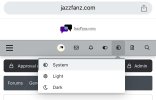
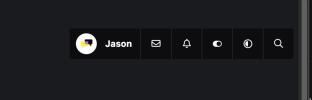
Dark Mode has been slightly changed. It's in the footer and up near your name. Look for the circle/sun/moon icon.
 
Dark Mode has been slightly changed. It's in the footer and up near your name. Look for the circle/sun/moon icon.
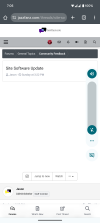
I might be blind but I can not find the dark mode option now. I am looking for any icon near the footer or name and there is nothing. Ive looked on both my phone and computer and dont see. This is on a PC and android using chrome.

Also the main page isnt changing colors to show unread messages in the forums. Only once you click on the forum do you see it changed colors for threads with unread messages.
 
I might be blind but I can not find the dark mode option now. I am looking for any icon near the footer or name and there is nothing. Ive looked on both my phone and computer and dont see. This is on a PC and android using chrome.

Also the main page isnt changing colors to show unread messages in the forums. Only once you click on the forum do you see it changed colors for threads with unread messages.
I’ll look at the second one when I can. Here’s a screenshot of the theme setting on mobile:
 

Attachments

  • IMG_2174.jpeg
    IMG_2174.jpeg
    173.1 KB · Views: 7
I'm on my phone and can't see the icon to switch modes. I'm stuck in dark mode and trying to get to regular mode.
 
I’ll look at the second one when I can. Here’s a screenshot of the theme setting on mobile:
Yeah, I dont show that icon. I have the customize button next to it. I also dont have the sheet looking one next to it. I have 4 icons, you have 6 on your picture. As far as the second part goes I was wrong. It changes to slightly purple now I didnt notice at first.
 
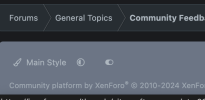
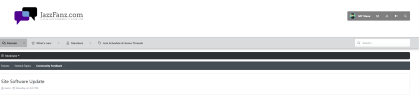
On PC it looks like this. Also, check in the footer, do you see an art brush in the lower left? Curious what displays on that line?
 

Attachments

  • Screenshot 2024-07-22 at 9.13.34 PM.png
    Screenshot 2024-07-22 at 9.13.34 PM.png
    22.1 KB · Views: 2
  • Screenshot 2024-07-22 at 9.14.48 PM.png
    Screenshot 2024-07-22 at 9.14.48 PM.png
    34.4 KB · Views: 2
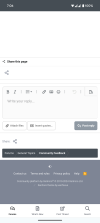
Here is a screenshot from my phone. I can send from the PC later. Oddly it seems half the time I go the website is dark mode the other half light.
 

Attachments

  • Screenshot_20240723-070607.png
    Screenshot_20240723-070607.png
    138.7 KB · Views: 4
  • Screenshot_20240723-070553.png
    Screenshot_20240723-070553.png
    178.7 KB · Views: 4
Here is a screenshot from my phone. I can send from the PC later. Oddly it seems half the time I go the website is dark mode the other half light.
Had an idea. What about now?

If that works, I’ll have to fix everyone else that may have had dark mode prior as well.
 
Back
Top